
The Biggest PowerLibs Update Yet
This has been a massive few months. Full apps, new component categories, new tools, and a lot of quality-of-life improvements. Here's everything that's new!
Full Apps
In the last changelog I teased that full apps were coming. They're here now, and they're one of the biggest things in PowerLibs.
The idea is simple: instead of waiting months until an entire app is finished, I'm releasing them screen by screen. That way you can already start building with what's available, and I keep adding more screens over time.
Feedback App
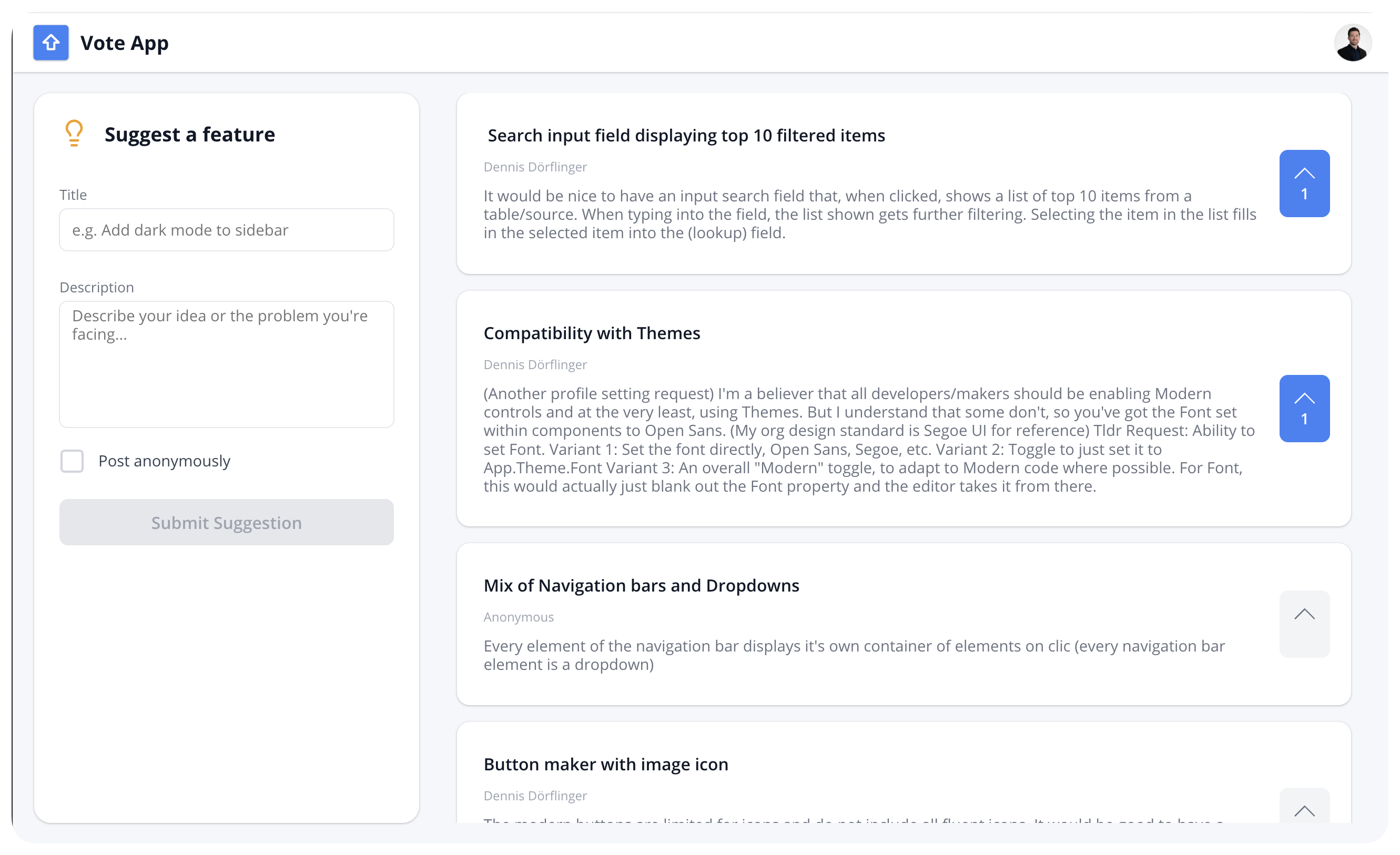
A complete app for collecting feature requests and bug reports from your team. Users can submit suggestions, vote on ideas, and optionally post anonymously.
- Submit suggestions with title and description
- Vote system (one vote per user)
- Anonymous posting option
- Comments Add-on you can toggle on, which adds comment count badges and a comment popup
- Gallery sorted by most votes
Check it out: Feedback App
Project Management App
This one has been requested by a lot of users. It currently has two screens:
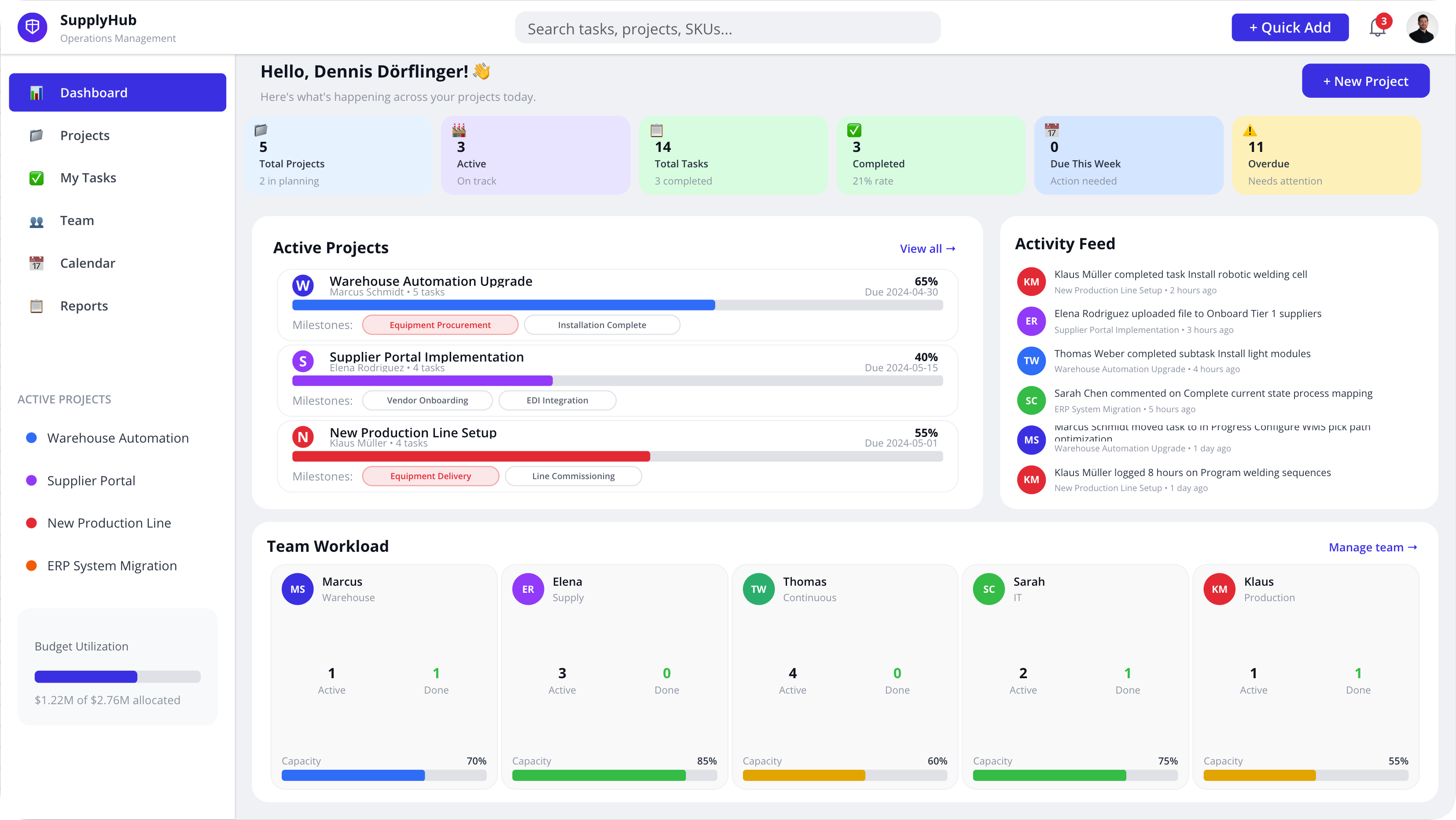
Dashboard with navbar, sidebar, stats gallery, active projects with progress bars, activity feed, team workload, and budget utilization. I'm working on making the dashboard more customizable so you can decide which modules to show and quickly add or remove sections. I'm also adding more logic to the app and showing which data lists you need to use it properly. I'm learning by doing here, and your feedback really helps me make the rest of the app better.
Projects Page is a second screen with a responsive project card gallery, sidebar with project navigation, budget overview, and project templates button.
Both screens come in two style variants: Colorful (vibrant indigo-based) and Neutral (clean zinc/gray monochrome for a more corporate look). There's also a "New Project" popup modal with a form for creating projects.
Check it out: Project Management App
More full apps are planned and actively being worked on. Stay tuned!
15+ New Components
Two entirely new categories and a bunch of additions to existing ones.
Steppers (New Category, 5 components)
- Horizontal Stepper : Step-by-step progress with numbered circles and connecting lines
- Vertical Stepper : Vertical progress for approval workflows
- Checklist Progress : Task checklist with progress bar and checkboxes
- Timeline Progress : Vertical timeline tracker, great for delivery status or project milestones
- Animated Progress Bar : Timer-driven progress with start/pause and percentage display
All steppers support drag-and-drop reordering of steps in the settings.
Tooltips (New Category, 5 components)
- Simple Tooltip : Clean dark tooltip bubble
- Help Icon Tooltip : Question mark icon with tooltip
- Delete Confirmation : Inline "Are you sure?" popover
- Context Menu Popover : Kebab menu with action items
- Rich Help Popover : Help popover with header, content, and action buttons
New Modals (6 new)
- Input Modal : Modal with multi-line text input
- Info Modal : For system updates and announcements
- Form Submit Modal : Submission confirmation with validation checklist
- Logout Modal : Sign out confirmation
- Unsaved Changes Modal : Save / Discard / Stay buttons
- Permission Request Modal : With approval summary
Plus: all modals now have info box show/hide toggles in settings so you can turn sections on and off.
New Dropdowns
- People Picker : Search for people with avatars, supports Office365Users connector or a static list
- Searchable Lookup : Live search dropdown with SharePoint/Dataverse support
Other Additions
- Gallery with Filter Header : A new gallery component with sortable column headers you can click to sort ascending or descending
Modern Controls YAML
19+ components now have Modern Controls YAML generators. When you copy a component, you can choose between Classic or Modern YAML.
This now covers all sidebars, all navigation bars, all modals, and several card components. The Modern version uses the newer Power Apps control types like Text, Button, and GroupContainer.
SVG Editor
This was requested by a lot of users, especially those who use PowerIcons.dev. Instead of switching tabs between PowerIcons and PowerLibs, you can now edit SVGs directly inside PowerLibs.
- Paste any SVG code
- Auto-detects all colors in the SVG
- Change colors with color pickers
- Show/hide elements by color
- Click individual elements to remove them
- Export as Power Apps YAML, clean SVG, or PNG
- Drag and drop SVG files
- Save edited SVGs to your SVG Library
My vision has always been to build one place that has everything you need while building Power Apps. The SVG Editor is another step in that direction.
Find it under Tools > SVG Editor.
Multi-Step Form Builder (Early Version)
Building multi-step forms in Power Apps normally takes a lot of time. The Multi-Step Form Builder is designed to save you that time. It's available now as a first version. It's not fully finished yet, I'm still updating it piece by piece, but the basics work and it already generates solid YAML.
- Build forms with multiple sections that show/hide based on progress
- Drag and drop sections to reorder
- Branching: sections can depend on field values (dropdown selection, text input, date)
- Generates Power Apps YAML, OnStart formula, Patch formula, and Reset formula
- Submit button auto-generates the full Patch() with all field mappings
I'll keep improving this over the coming weeks. Try it out: Multi-Step Form Builder
PowerFx Toolkit: 145+ Functions
The PowerFx Toolkit went from about 30 items to over 145. I basically added everything you could need:
- AI Functions like AIClassify, AISummarize, AITranslate, and more
- Math & Trigonometry like Abs, Sqrt, Sin, Cos, and 10+ more
- Date & Time like Day, Month, Year, Hour, Minute, DateValue, EDate, and more
- Error Handling like Error, IfError, IsError, IsBlankOrError
- Form Functions like SubmitForm, EditForm, NewForm, ResetForm, ViewForm
- Table Shaping like AddColumns, DropColumns, RenameColumns, ShowColumns
- Operators with 9 info cards covering arithmetic, comparison, membership, and more
Each function has examples and a code generator. PowerFx Toolkit
Community Section
I've added a Community tab where paid users can share their Power Apps components with others. Think of it as a place to browse what others have built, get inspired, and save components to your own library.
- Share components from your Custom Library
- Browse, search, and filter by tags
- Like components you find useful
- Save components to your personal library with one click
This is still early. I'm testing if there's interest in a community around sharing Power Apps components. If you've built something cool, share it! You can find it under the Community tab.
Live Preview in Settings
When you open the settings for a component, there's now a mini live preview at the top that shows your changes in real-time. Before, you had to switch between the Settings and Preview tabs to see what changed. Now you just edit and see the result instantly.
This makes customizing components much faster and more intuitive.
Team Plans
You can now get PowerLibs for your whole team. Team seats are cheaper than individual seats, and every team member gets full Ultra access.
- Add team members via email invitation
- Team dashboard for managing members
- Everyone on the team gets access to all components, tools, and features
- Volume pricing: the more seats, the cheaper per person
If you're already on an individual plan and want to switch to a Team plan, just send me a message and I can upgrade you manually.
MCP Integration Updates
The MCP Integration (for Claude, Cursor, VS Code, GitHub Copilot) got several improvements:
- Free tier: Any PowerLibs account can now use MCP tools (13 free components + full PowerFX reference)
- Multiple API keys: Create up to 5 named keys (e.g. "Work Laptop", "Home Desktop")
- YAML Syntax Reference: A tool your AI assistant can call to get the real Power Apps YAML rules, including correct control types, version numbers, layout properties, and which properties are valid. This means fewer paste errors and broken controls.
- Common Error Patterns: A library of known mistakes (wrong control names, missing
=on formulas, incorrect versions) that the AI checks against before generating YAML. Think of it as a cheat sheet that prevents the most common problems. - CSV-to-Form Generator: Paste your column names and types (from a CSV, SharePoint list, or Dataverse table), and the tool generates a complete form with all the fields, ready to paste into Power Apps. If you provide a data source, it even builds the Patch() formula for the submit button.
The MCP is becoming a big focus for me. I have a lot of ideas for new features, including eventually connecting to your data so you can do a lot more with just the MCP integration. Expect more updates on this soon.
---
Where to find everything:
- Full Apps: Feedback App | Project Management App
- Steppers: Steppers
- Tooltips: Tooltips
- New Modals: Modals
- SVG Editor: SVG Editor
- Multi-Step Form Builder: Form Builder
- Community: Community
- Team Plans: Pricing