
Your font, not mine
Until today every component you copied came out in Open Sans, because that was hardcoded into the generated YAML. If your organisation standardises on Segoe UI, or anything else, there was no way to change it without editing every control by hand after pasting.
This was the most requested feature on the feedback board, and it is now live.
How it works
Open Settings, and under Brand Color you will find a new Font picker. Choose one, save, and every component you copy from that point on uses it. Nothing else about your components changes.
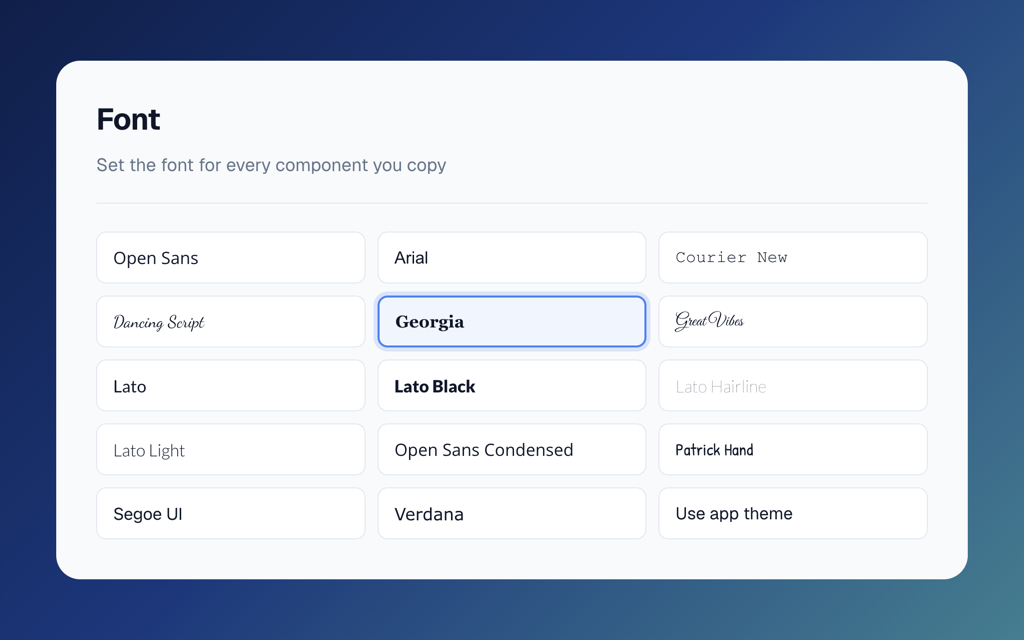
All 14 fonts Power Apps supports are there:
- Open Sans, Open Sans Condensed
- Segoe UI
- Arial, Verdana, Georgia, Courier New
- Lato, Lato Light, Lato Hairline, Lato Black
- Dancing Script, Great Vibes, Patrick Hand
Or use your app theme
There is one extra option at the end: Use app theme. Pick that and components leave the Font property out entirely, so each control inherits App.Theme.Font from your app. If you already theme your apps properly, this is the one you want, because your components will follow your theme automatically instead of being pinned to a specific font.
The previews match
The preview in PowerLibs now renders in the font you picked, so you can see the result before you copy anything. Previously previews showed a mix of fonts that did not always match what you got in Power Apps Studio. They match now.
Your existing components are untouched. If you never open the setting, everything keeps working exactly as before.